

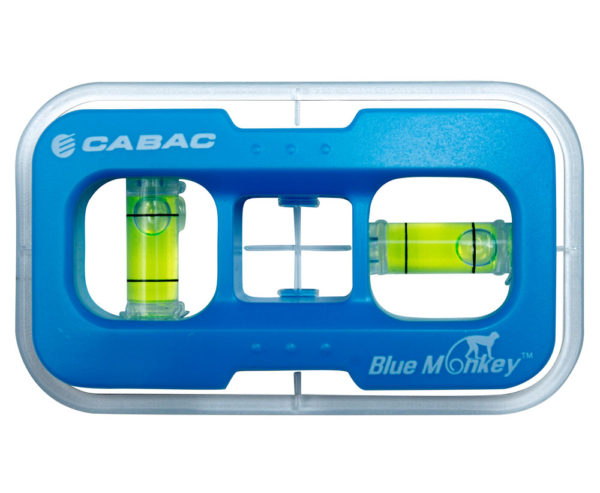
Blue MonkeyTM Plug Point Level Stencil
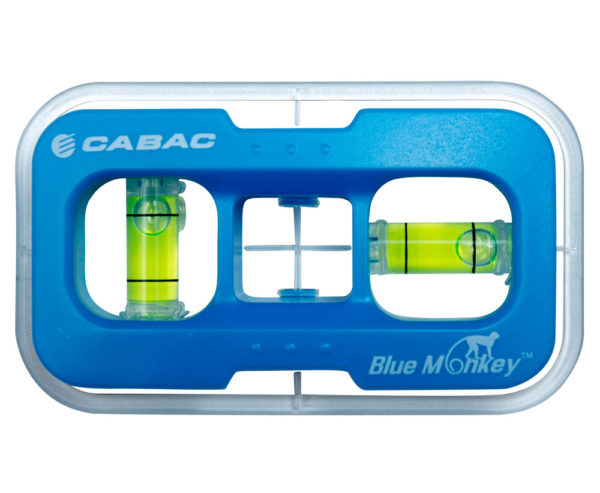
The Blue MonkeyTM is a must have tool when fitting C-brackets for plug points and light switches. This clever stencil is easy to use and includes a built in level indication.
The Blue MonkeyTM template ensures FAST, CLEAN, ACCURATE installations every time.
Blue MonkeyTM Features
- Easy to position and mark C-bracket cut-out
- Vertical and horizontal level indication
- Clear centre mark positioning
Instructions of use
- 1. Measure the position desired for the plug point and mark the centre point of the hole you wish to cut for a C-bracket.
- 2. Check for studs, metal brackets and power cords behind the plaster board using a suitable stud finder.
- 3. If there are no studs, place the Blue MonkeyTM and match the cross-hair in the centre with the marked point on the plaster board.
- 4. Check that the Blue MonkeyTM is level (horizontally or vertically) and draw around the stencil with a pencil or pen.
- 5. Using a Wall Board Saw, cut around the outline.
- 6. Place a C-bracket in the cut-out hole.
- 7. Connect and fit the plug point.
Reviews
There are no reviews yet.