HDMI Cable Versions: How to Choose the Right One for Your Device?
Published by - mahesh gupta on June 19, 2026 HDMI
You’d think buying an HDMI cable would be simple. It’s just a cable, right?
Then you open the product page and see “HDMI 1.4”, “HDMI 2.0”, “48 Gbps bandwidth”, “Ultra High Speed certified” – and suddenly you’re second-guessing everything. Does the version actually matter? Will the cheap one from the discount bin work just as well? And why does your brand-new 4K TV still look average?
The honest answer is: yes, the version matters – but only if your devices need it. Buy too low and you’ll bottleneck your expensive gear. Buy too high and you’ve wasted money on specs you’ll never use.
This guide explains every HDMI version in plain English, tells you exactly what each one is for, and helps you match the right cable to whatever you’re connecting – TV, gaming console, projector, monitor, or home theatre.
First, Understand What HDMI Actually Does
HDMI- High-Definition Multimedia Interface — carries both high-definition video and audio through a single cable. It’s the standard connection between your devices: TV to soundbar, laptop to monitor, gaming console to screen, Blu-ray player to AV receiver.
Every new HDMI version increases the amount of data the cable can carry — measured in gigabits per second (Gbps). More bandwidth means support for higher resolutions, faster refresh rates, and richer colour. The version of your cable needs to match — or exceed — what your devices are capable of sending and receiving.
If the cable’s bandwidth is too low for your device, one of two things happens: the image downgrades to fit what the cable can handle, or nothing displays at all.
The HDMI Versions, Explained Simply
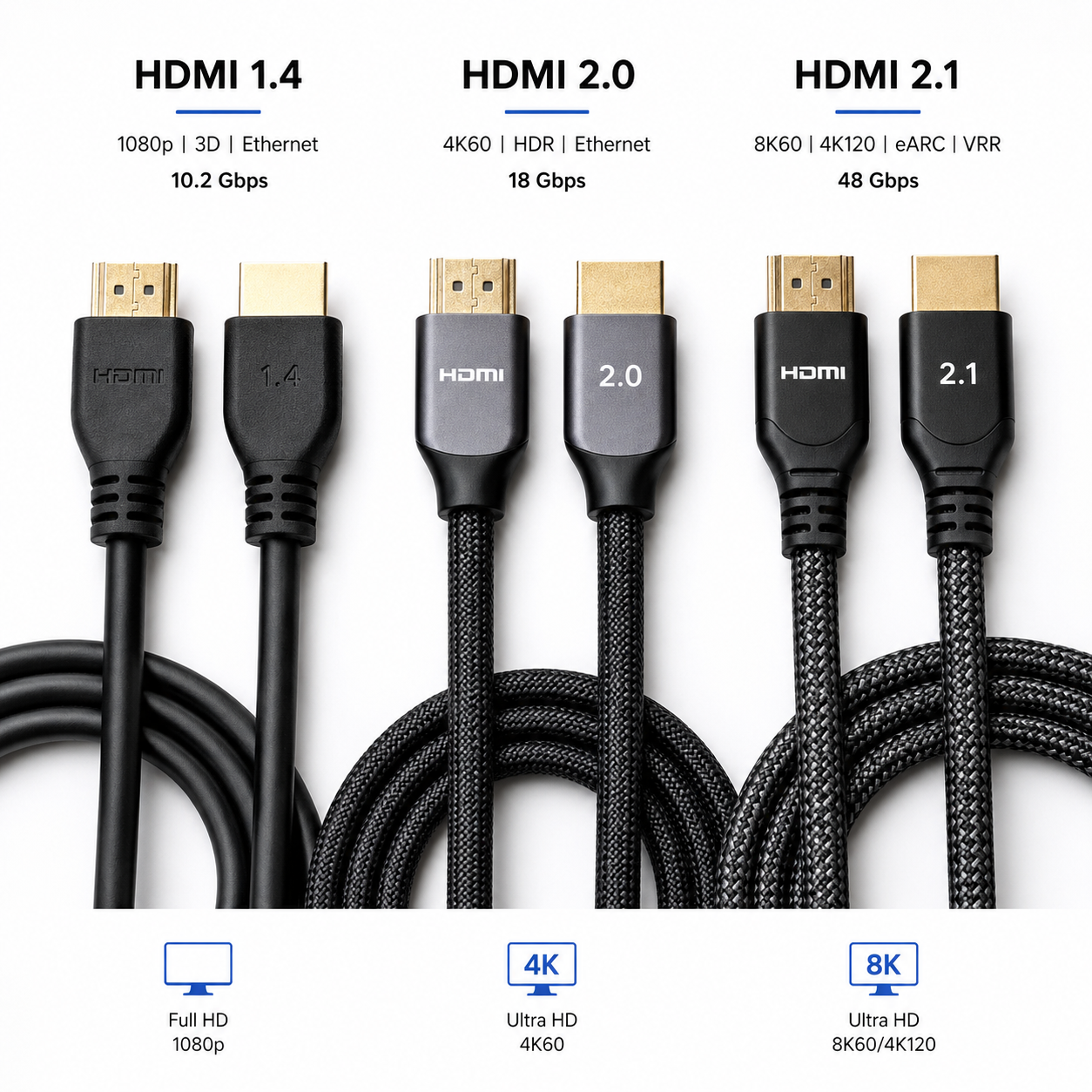
HDMI 1.4 – The HD Era Standard
Released back in 2009, HDMI 1.4 was a big deal at the time. It introduced 4K resolution support, 3D video, and a feature called Audio Return Channel (ARC) that lets your TV send audio back to a soundbar or receiver through the same cable – no separate audio cable needed.
The catch: HDMI 1.4 only supports 4K at 24 or 30 frames per second. That’s acceptable for watching films, but it’s noticeably choppy for sport, gaming, or any fast-moving content.
Bandwidth: 10.2 Gbps
Still relevant for: older HD TVs (1080p), budget streaming setups, connecting to legacy equipment made between 2010 and 2016.
Not suitable for: 4K gaming, 4K content at 60Hz, HDR.
HDMI 2.0 – The 4K Sweet Spot
HDMI 2.0, released in 2013, is still the most widely used standard in Australian homes today. It jumped bandwidth from 10.2 Gbps to 18 Gbps, which unlocked the things people actually want from a 4K TV:
– 4K at 60Hz – smooth, fluid picture for streaming and everyday viewing
– HDR (High Dynamic Range) – significantly better contrast and colour depth
– Wide colour gamut support
– Up to 32 audio channels
The majority of 4K TVs sold between 2015 and 2021, plus devices like the PS4 Pro, Xbox One X, Apple TV 4K (first generation), and Chromecast Ultra, all use HDMI 2.0 ports. If this describes your setup, a Premium High Speed HDMI cable rated at 18 Gbps is exactly what you need.
Bandwidth: 18 Gbps
Best for: 4K TVs, streaming devices, PS4 Pro, Xbox One X, most modern monitors.
Not suitable for: PS5/Xbox Series X at 4K/120Hz, 8K TVs, next-gen gaming features like VRR.
HDMI 2.1 Built for What’s Coming Next
HDMI 2.1 is where the spec sheet starts to look futuristic. Launched in 2017 but only becoming mainstream from 2020 onwards, it nearly triples the bandwidth of HDMI 2.0 – jumping to 48 Gbps. That headroom enables a whole list of features that matter particularly for gamers and high-end home theatre setups:
– 4K at 120Hz – buttery smooth gaming on PS5 and Xbox Series X
– 8K at 60Hz – for 8K TVs
– Variable Refresh Rate (VRR) – eliminates screen tearing without input lag
– Auto Low Latency Mode (ALLM) – your TV switches to Game Mode automatically
– Enhanced Audio Return Channel (eARC) – full lossless Dolby Atmos and DTS:X audio over a single cable, without the limitations of the older ARC standard
If you’ve invested in a PS5, Xbox Series X, a premium OLED TV from 2021 onwards, or a high-refresh 4K gaming monitor, HDMI 2.1 is the only way to get everything you paid for.
Bandwidth: 48 Gbps
Best for: PS5, Xbox Series X, 4K/120Hz gaming, 8K TVs, eARC soundbars, future-proofing.
Worth noting: many TVs advertise “HDMI 2.1” but only deliver 40 Gbps rather than the full 48 Gbps. This still supports 4K/120Hz but caps out before 8K. Check your TV’s manual for the actual bandwidth spec if this matters to you.
The Other Way Cables Are Labelled: Speed Ratings
Walk into any electronics retailer – or browse Cables Online – and you’ll often see HDMI cables described by speed rating rather than version number. These categories map directly to the versions above:
| Speed Rating | Bandwidth | Equivalent To |
|---|---|---|
| Standard HDMI | 4.95 Gbps | HDMI 1.0–1.2 era |
| High Speed HDMI | 10.2 Gbps | HDMI 1.4 |
| Premium High Speed HDMI | 18 Gbps | HDMI 2.0 |
| Ultra High Speed HDMI | 48 Gbps | HDMI 2.1 |
Premium High Speed and Ultra High Speed cables can carry official certification labels – a small printed badge that confirms the cable has been independently tested and genuinely meets its claimed spec. This matters more for Ultra High Speed cables, where uncertified cables claiming 48 Gbps support are unfortunately very common.
Match Your Cable to Your Device
You have a standard 1080p TV
A High Speed HDMI cable covers everything you need. Don’t overthink it — focus on a well-built cable with solid connectors rather than chasing bandwidth specs you’ll never use.
You have a 4K TV and stream content
Go with Premium High Speed HDMI (18 Gbps). This covers 4K at 60Hz and HDR from every major streaming service – Netflix, Disney+, Stan, Apple TV+, YouTube 4K. It also handles ARC for your soundbar.
You have a PS5 or Xbox Series X
You need Ultra High Speed HDMI (48 Gbps). Both consoles ship with one in the box, but if you need a longer cable or a replacement, make sure it’s certified Ultra High Speed — not just labelled “HDMI 2.1” without certification. Without it, 4K/120Hz and VRR won’t work.
You have a 4K gaming monitor at high refresh rates
Check your monitor’s spec sheet. For HDMI connections at 144Hz or above, you’ll need Ultra High Speed HDMI. Note that many competitive gaming monitors prefer DisplayPort for maximum bandwidth — HDMI 2.1 is the alternative if your GPU only has HDMI outputs.
You have a soundbar or AV receiver
For standard ARC, Premium High Speed HDMI is sufficient. For eARC — which carries full lossless Dolby Atmos – you need Ultra High Speed HDMI on the eARC-labelled port of your TV.
You’re connecting a laptop to a screen
For 1080p or 1440p work use, High Speed is fine. For 4K output, use Premium High Speed. If your laptop has USB-C or Thunderbolt ports only, you’ll need a USB-C to HDMI adapter or cable – the HDMI version it supports is determined by your laptop’s port, not the cable itself.
You’re running a long cable to a projector or boardroom screen
Standard passive HDMI cables work reliably up to around 7–8 metres for Premium High Speed, and 3–5 metres for Ultra High Speed. Beyond that, consider:
- Active HDMI cables — have a built-in booster chip, reliable up to 15–20 metres
- Fibre optic HDMI cables — incredibly thin and flexible, carry full bandwidth up to 30m, 50m, even 100m with zero signal loss. Cables Online stocks a range of fibre optic hybrid HDMI cables suited to commercial and long-run residential installs.
Does a More Expensive HDMI Cable Give You a Better Picture?
No – and this is one of the most persistent myths in consumer electronics.
HDMI is a digital signal. It either arrives intact or it doesn’t. There’s no spectrum of “slightly better picture” based on how much you spent. A $15 certified Premium High Speed cable will produce an identical image to a $150 premium-branded one on the same setup.
What does matter:
- Certified bandwidth – the cable genuinely meets the speed it claims. This is the only spec that affects performance.
- Build quality – connector durability, strain relief where the cable meets the plug, and jacket flexibility. These affect how long the cable lasts, not how it looks on screen.
- Length – longer cables require better shielding. This is where spending a bit more is genuinely justified.
The practical takeaway: buy a certified cable from a reputable supplier at a sensible price. Avoid suspiciously cheap uncertified cables – particularly for HDMI 2.1 – and don’t pay a premium for brand names.
The Short Version: What Cable Do You Actually Need?
| Your Device | Buy This |
|---|---|
| 1080p TV, any brand | High Speed HDMI |
| 4K TV, streaming only | Premium High Speed HDMI (18 Gbps) |
| 4K TV with HDR and soundbar | Premium High Speed HDMI (18 Gbps) |
| PS5 or Xbox Series X | Ultra High Speed HDMI (48 Gbps) |
| 4K gaming at 120Hz | Ultra High Speed HDMI (48 Gbps) |
| eARC soundbar or AV receiver | Ultra High Speed HDMI (48 Gbps) |
| 8K TV | Ultra High Speed HDMI (48 Gbps) |
| Projector or long cable run | Active or Fibre Optic HDMI |
| Laptop to monitor (4K) | Premium High Speed HDMI (18 Gbps) |
Find the Right HDMI Cable at Cables Online
Cables Online carries the full range — from everyday High Speed cables through to Premium High Speed, Ultra High Speed HDMI 2.1, active boosted cables, and fibre optic long-run options — all available for fast delivery across Australia.
Browse the full HDMI cable range: cablesonline.com.au/cables/hdmi-cable/
Not sure which cable suits your setup? Call us on 1300 178 620 or send a message through our contact page — our team is happy to point you in the right direction.
Related Blogs
HDMI Cables give High Speed Media transfer for HDTV
Published by - Cables Online on June 10, 2019
Different Networking Devices And Hardware Types — Hub, Switch, Router, Modem, Bridge, Repeater
Published by - Cables Online on February 19, 2019